Welcome to the new series!
New revised & expanded series of books in the works.
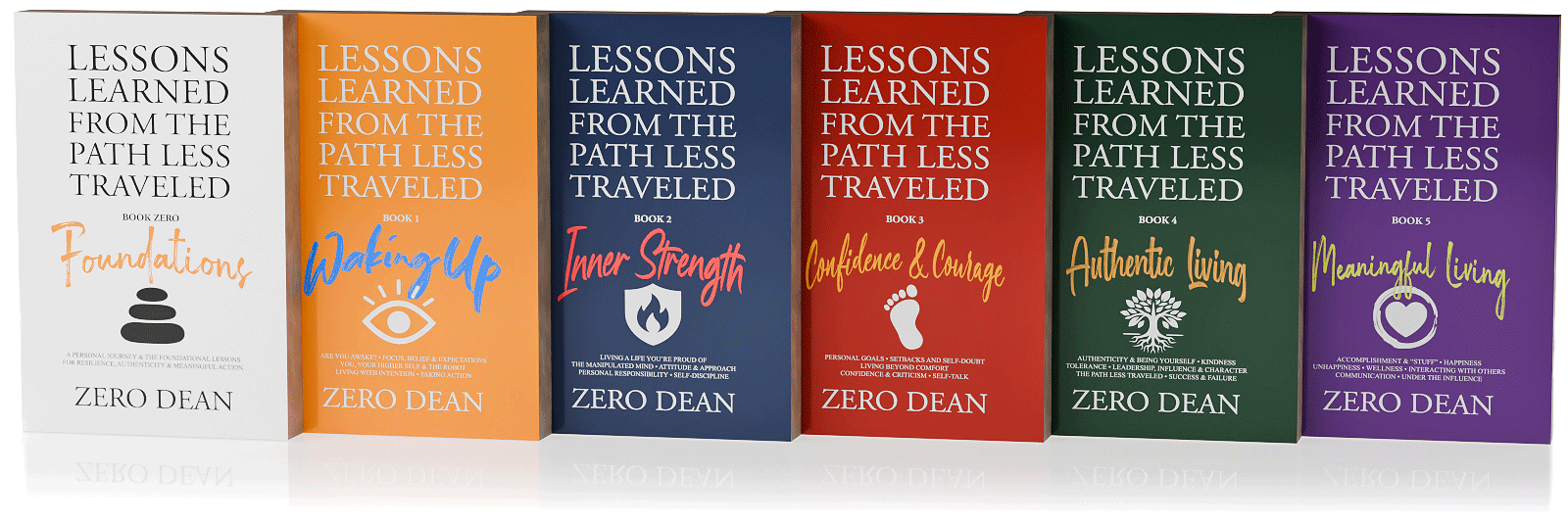
New Lessons Learned From The Path Less Traveled™ series!
Book Zero: Foundations:
A Personal Journey & the Foundational Lessons for Resilience, Authenticity & Meaningful Action.
(~400 pages)
Book 1: Waking Up:
Are You Awake? • Focus, Belief & Expectations • You, Your Higher Self & The Robot • Living With Intention • Taking Action
(~341 pages)
Book 2: Inner Strength:
Living a Life You’re Proud Of • The Manipulated Mind • Attitude & Approach • Personal Responsibility • Self-Discipline
(~299 pages)
Book 3: Confidence & Courage:
Personal Goals • Setbacks and Self-Doubt • Living Beyond Comfort • Confidence & Criticism • Self-Talk
(~339 pages)
Book 4: Authentic Living:
Authenticity & Being Yourself • Kindness • Tolerance • Leadership, Influence & Character • The Path Less Traveled • Success & Failure
(~306 pages)
Book 5: Meaningful Living:
Accomplishment & “Stuff” • Happiness • Unhappiness • Wellness • Interacting With Others • Communication • Under the Influence.
(~306 pages)
Sign up to get notified of releases!
Sign up for my newsletter below and/or follow my Amazon author page to get notified of my new release updates and special offers (including promotional offers).
What you should know about these new books...
The book releases are being written as a single manuscript, but will be staggered releases.
As of this post, each book is considered “content complete” and “near final”. As such, I’m now taking time away from working on them in order to read them from a fresh perspective when I do the final polish pass.
Once Book Zero is published, the next books will follow 4-8 weeks after each release. Unlike my first book, I will be personally recording the audiobook versions.
Six books!? Crazy, I know. These books are derived from a single mega manuscript that was split into five parts. After my first book was released in December 2018, I continued writing for Volume 2. Then the pandemic hit (remember that?) and I had even more time to write.
When I finally got around to compiling these new lessons into the second volume, I realized they naturally belonged alongside related content in the original book rather than standing alone. And when I realized I had more material than would fit into a single volume, I decided to not only revise and expand everything, but also collect and consolidate all the lessons I’ve written over the years (since 2010) and then split the single mega-manuscript into as many separate books as necessary.
Turns out that was six books
All the books in this series can be read independently.
Like the lessons on each page, each volume can be read independently without requiring context from the others. While each lesson is designed to stand on its own and can be read in any order, the material builds progressively throughout each book and across the series, offering the greatest impact when read as a comprehensive work.
However, Book Zero stands out as the only volume containing personal journal entries (46 of them plus reflections) that provide context for my journey and highlight the lessons learned from these formative experiences along the path less traveled.
Serving as the foundation for subsequent volumes, Book Zero includes not only these personal reflections but also a lessons sampler from every chapter throughout the entire series.
I consider the Book Zero to be the most essential as it offers insight into both my personal journey and the inspiration behind the entire series.
The original book released December 2018
Lessons Learned From The Path Less Traveled™
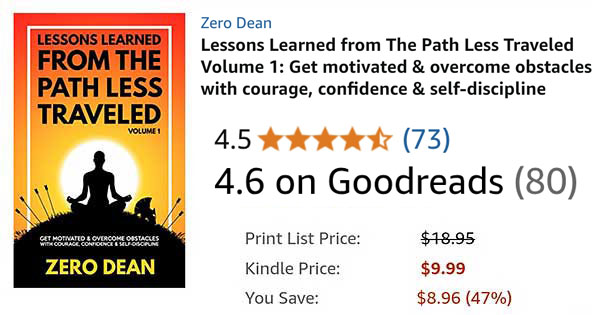
Lessons Learned From The Path Less Traveled™ Volume 1 features approximately 400 potentially life-changing lessons for men and women of all ages from all walks of life.
Read a book that changes lives or give a powerful gift to anyone you care about.
Available since December 2018
Paperback
$
13
01
-
A real book that you can write in the margins, fold the pages, and smell the interior.
-
REGULAR PRICE $18.95
E-book
$
3
99
-
A digital copy that you can read on your mobile phone, tablet, or laptop.
-
REGULAR PRICE $9.99
WHAT READERS SAY
Rarely have I related to a book so much before.
ReaderInstagram
This book is exactly what I need right now and one that I will gift to others. Thank you for your hard work!
ReaderFacebook
It's 2019 folks, we don't need to scour the world to find actionable wisdom to make our lives better. Open any page in this book and you're on your way.
ReaderInstagram
Loved your book. Certainly gets you motivated and so much positivity in there which is nice to read. Will certainly recommend others to read it. Thank you.
ReaderInstagram
I think this is a brilliant book. Very positive and helps you move forward in life. #mustreadbooks
ReaderInstagram
Incredible book. Amazing read! Must read it once in your lifetime. Looking forward to the volume second. Highly recommended!
ReaderAmazon, India
I love your book. I think many people would benefit from reading it. It works like a reference manual and is very helpful to me every day.
ReaderInstagram
...I've been waiting for this book for about a year now. Never have I been more excited looking forward to reading a book before. And the wait was worth it.
ReaderInstagram
Zero Dean, your book is blowing my mind."
ReaderInstagram
I'm about halfway through and absolutely love it!
ReaderFacebook
Really an excellent book. Received mine and I am loving the insights.
ReaderInstagram
I just bought the hard copy on Amazon. 100 pages in and loving it!
ReaderInstagram
Just wanted to let you know I was sitting on the platform at 34 St. with my sons waiting for the downtown 2/3 train while reading your book and someone stopped to tell me your book was life-changing. Just wanted to share that with you to let you know the impact you're having around the globe!
ReaderInstagram
WHERE TO GET IT IN YOUR PART OF THE WORLD
The original edition
OVER 8 YEARS IN THE MAKING
Lessons Learned from The Path Less Traveled™ Volume 1 represents nearly a decade of lessons that were all prompted by and learned from actual life experiences along the path less traveled.
This book is packed with pages of encouragement, food for thought, reminders, and strategies to help readers cope with and overcome life’s challenges.
350 pages
Over 100,000 words
More than 400 lessons
This book is packed with content.
Lessons to help you
- Develop discipline
- Boost your confidence
- Expand your awareness
- Increase your resilience
- Manage your time better
- Deal with discomfort
- Reduce stress
- Face your fears
- Find motivation & take action
- Overcome challenges & obstacles
- Ensure you are on the right path
- Discover what makes you happy
- Protect against manipulation
- Immunize against criticism
- Nurture your relationships
- Live a meaningful life
No fluff. Minimal white space. No giant fonts.
From page 1 to page 350, everything in this book was written & included with the potential value it may add to reader’s lives in mind. Lessons Learned From The Path Less Traveled Volume 1 features approximately 50% more content than “You Are a Badass” condensed into a book that is roughly the same physical size.
Read it your way. Lessons can be read in any order from any page.
Read a little or a lot. Lessons take anywhere from 5 seconds to 5 minutes to read. Read whenever you want & choose only what you have time for.

Let me be frank…
If this book has as much of a positive impact on your life as I believe it has the potential to, it is my hope that you’ll find it to be of far more value than the cover price. That is one of my goals in writing this book.
I truly want this book to change your life for the better.
While I can’t claim this book will change your life for the better, I can promise you that if it doesn’t, it isn’t from a lack of effort in trying to write a book that will.
Each piece is written to be as potent as possible. Every sentence, paragraph, and lesson is as concise as I was able to make it given my understanding of the lesson being shared at the time and my current skill in writing it.
Also, this is not a book that you read once, get pumped up about its contents, and then forget about. Lessons Learned from the Path Less Traveled is a book designed to be dipped into repeatedly over time — years, even. And I hope that you will.
WHO THIS BOOK IS FOR
While this book is packed full of potentially life-changing lessons for men & women of all ages, it’s not for everyone. This book is for those who are willing to keep an open mind, as well as think critically, while they read. It’s for those who believe they can change, are willing to change, and can commit to keep trying to change no matter how difficult the path may appear.
Because this book is for those who recognize that anything worth having is worth working for. And it’s for those who understand that long-lasting change takes effort and action, not wishful thinking.
Ultimately, this book is for those who already know — or those who are willing to learn — that the only thing that truly stands between the person they are and the person they want to be is themselves.
If this sounds like you — or like someone you want to be — then this book will likely be well worth your time and investment.
A FEW LINES FROM
Lessons Learned From The Path Less Traveled Volume 1
Included in Kindle Unlimited!
(sign up for a free trial & read my book for free)
In order to offer the lowest price possibilities, my book is currently not enrolled in Kindle Unlimited.
Kindle Unlimited is the Netflix of books. For only $9.99 per month (which you can cancel at any time), you get unlimited access to millions of books that you can read on any device.
Better yet, you get a 30-day free trial to test the service (sometimes up to 90 days for only $2). So you can read as many books as you can during those 30 days – including mine. :)
